Google Anlatics

Tuesday, December 16, 2008

26 Ways To Know Your Software Development Project Is Doomed – Esther Schindler, CIO December 10, 2008

Despite all our efforts to make every software development project a success, some are cursed from the very start. Here are 26 early warning signs—all, alas, real-world experiences—that an enterprise software development project is headed for a death march.
  • The project name changes for the third time in as many months.

  • The development manager decides that it is better to write a completely separate version of the software for the U.K. rather than to internationalize a single version.

  • The requirements definition is begun four months after development started.

  • The newly hired director of R&D proudly informs the board of directors that the project will be 99 percent completed six months ahead of schedule, and assures the board that the software can ship directly to clients without going through beta testing.

  • You are a Web developer. You open the ZIP file with the HTML documents the client produced for the site scripts you need to integrate with the Web application. And you discover the client's HTML documents are all Microsoft Word files, saved in HTML format.

  • You realize the reason the company hired you as a consultant is to referee a dispute among two competing departments over which technical platform to use.

  • The memo says you will develop a 64-bit application using a 16-bit platform.

  • The developer doesn't understand the spec document and continues to develop anyway. And the QA team doesn't know how to test, but they "test" anyway.

  • When you see the project budget, you realize that over half of it was spent on a Web designer to create a Photoshop mock-up of the home page—with no regard to whether that design is feasible. Or with any attention to the thousands of pages of content that will exist underneath that home page.

  • The user or client requests new features instead of focusing on bug fixing and performance enhancements.

  • You find a list of 16 software development best practices and realize that not a single one of them is being followed.

  • You are asked to port your project from Windows to MS-DOS.

  • The technical project manager asks you to compose the list of user requirements—without consulting any actual potential users.

  • People started sending notes "to file" rather than to each other. The notes are alibis about why the sender has nothing to do with the upcoming (but unacknowledged) failure.

  • Status reports are seen as insubordinate.

  • The new CIO replaces all the people who have deep organizational knowledge with outsiders from his old firm.

  • It is a big project and is named Project Iceberg. Or it's the third time the company is trying to pull this off, and the project is code-named "Phoenix." Somehow, you don't believe this one can spring from the ashes.

  • Even the customers who got the free version are pissed off.

  • The manager of your mission-critical project (handling 80 percent of the company's revenue) has three months exposure to the technology of choice, and is training four brand-new developers at once. The manager is given a three-month project deadline.

  • You learn that management had to insist that the interface definitions be checked into version control after the first code freeze.

  • They change the project manager and relocate the whole project from one city to another. (You consider yourself lucky that the cities are on the same continent.)

  • The QA team is told, "We've only allocated three weeks for testing" (on a project that has lasted six months already). Or QA is told, "The date is fixed. We have to have all this functionality by that date."

  • The program manager decided to try Agile methodology "to save time."

  • In a previous era, pre-cell-phones and ubiquitous Internet access: You get screeching abuse from a new project manager hired three days ago in New York, after you return from three days locked in regional CIO meetings in Frankfurt. Why? Because you hadn't responded to the e-mail messages she had sent (and which you didn't get), and you hadn't updated her "project dashboard" that you knew nothing about.

  • Management decides to spend a million dollars on a $20,000 project. Then the managers start agreeing with computer company salespeople that the $1 million in software requires $2 million of hardware. Meanwhile, a secretary purchases an off-the-shelf PC and a shrink wrapped CD containing some new office automation packages. She implements the project during her lunch break. (Arguably, we should count this one as a success.)

  • The lead developer tells you that maintaining a complete history of all database updates is a requirement for the application, but he hasn't had time to (read: doesn't know how to) design a data model for it yet. So he decides to go ahead and start with the Web front end and worry about it later. And this is the lead developer.

  • The business line leader/project funder says, "Get creative." This happens after management reduces the project headcount by 20 percent. And after the IT team pulls out the hardware that had been slated for recycling, saying it's your project's new hosting environment.

That's a list based on input from dozens of software developers and IT professionals. But, alas, it is incomplete. It requires you to add your moment of realization to the article comments, below.

Friday, November 21, 2008

ASP.Net Keyboard Shortcut Controls

ASP.Net Keyboard Shortcut Controls

Web Shortcut Controls


ASP.NET Keyboard Shortcut Controls are ASP.NET Controls that enable keyboard shortcuts in your web application. You can choose simple shortcuts like Enter, Tab or Space key, or different combinations by using CTRL, SHIFT, ALT keys, letters and numbers as alternative to mouse click, just like you used to do in Windows desktop applications. With keyboard shortcuts your web application will be more efficient for every day use and more accessible for users with disabilities.

Shortcut controls are inherited from standard Button, ImageButton and TextBox control. You can implement them in no time and you don't need to learn or code anything! All you need to do is to choose values of ALT, CTRL, SHIFT and Character properties according to your wishes (like in image bellow). Shortcut Controls will do the rest!

License includes complete source code , so you can achieve full integration with your web application and don't depend of closed solution.

Tuesday, November 11, 2008

mobilize your blog

this is the link for mobilize ur blog.......
http://www.mofuse.com


Why mobilize your blog?

Have you ever seen what your blog looks like on a mobile device? It's an unnavigable, garbled mess of text and images that nobody finds enjoyable to read. That's one reason, and it's probably your biggest reason for finding MoFuse. However we offer a lot more than just presenting your blog on mobile devices, here are some other reasons to mobilize with MoFuse:

Make your readers happy... People want to read your blog on the go!

Get new readers... MoFuse will help to promote your mobile blog which will increase traffic.

Make some money... Mobile ads will provide you with an additional revenue channel from your blog!

Get smarter... Our analytics let you see information about your mobile visitors.

Get going... More and more of your readers will want your content on their mobile devices!

Go back and mobilize your blog!
Why MoFuse?

Besides everything we just said, we're also the fastest growing blog mobilizing network. We currently power over 15,000 mobile blogs! Some of our users are amateur bloggers who do it for fun and some are professional bloggers who do it for a living.

We have all the right tools and features available to help you carve out your own presence on the mobile web.

Monday, November 10, 2008

If your interesting to write sinhala blog ..

It's time to write the way exactly you feel in sinhala .

They say ,
if you can write in your own language it is the most brilliant way to get exact thought of human being

This blog guide to you desire ....

http://sinhala-software.blogspot.com/

Thursday, November 6, 2008

Validation of viewstate MAC failed. If this application is hosted by a Web Farm or cluster, ensure that configuration specifies the same

Validation of viewstate MAC failed. If this application is hosted by a Web Farm or cluster, ensure that configuration specifies the same validationKey and validation algorithm. AutoGenerate cannot be used in a cluster.

if this kind of error occurred in your web page obviously your viewstate too large and you can solve this using Session.

cheers.

Monday, July 28, 2008

How to repair a SQL Server 2005 Suspect database

Sometimes when you connect to your database server, you may find it in suspect mode

Your database server won’t allow you to perform any operation on that database until the database is repaired.

A database can go in suspect mode for many reasons like improper shutdown of the database server, corruption of the database files etc.


To get the exact reason of a database going into suspect mode can be found using the following query,

DBCC CHECKDB (‘YourDBname’) WITH NO_INFOMSGS, ALL_ERRORMSGS
Output of the above query will give the errors in the database.

To repair the database, run the following queries in Query Analyzer,
EXEC sp_resetstatus ‘yourDBname’;

ALTER DATABASE yourDBname SET EMERGENCY

DBCC checkdb(‘yourDBname’)

ALTER DATABASE yourDBname SET SINGLE_USER WITH ROLLBACK IMMEDIATE

DBCC CheckDB (‘yourDBname’, REPAIR_ALLOW_DATA_LOSS)

ALTER DATABASE yourDBname SET MULTI_USER
and you are done.

You should keep one thing in mind while using the above queries that the repair mode used here , REPAIR_ALLOW_DATA_LOSS, is a one way operation

i.e. once the database is repaired all the actions performed by these queries can’t be undone. There is no way to go back to the previous state of the database. So as a precautionary step you should take backup of your database before executing above mentioned queries.

With SQL 2000 .........
First Step
"Suspect Mode" --> "Emergency Mode"

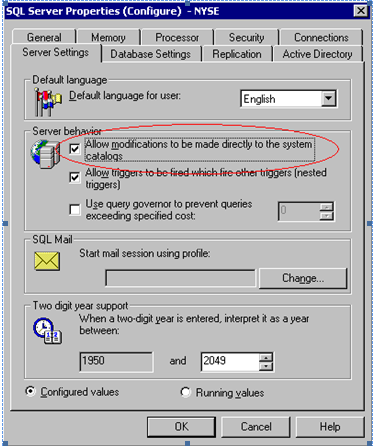
  1. Right click onto your server node, - an SQL Server
    Properties dialog will popup,
  2. Enable "Allow modifications to be made directly to the system catalogs" option


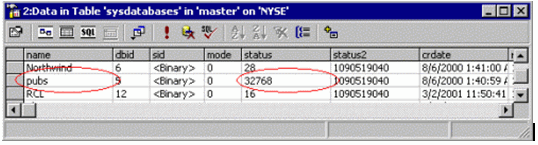
3. Now proceed to the sysdatabases table in the master
database, locate your database row and put 32768 into its status column


  • Restart SQL Server and refresh Enterprise Manager
  • Open Enterprise Manager - the
    database will be marked as "Emergency Mode"


you need to switch to an emergency mode, and you do it like this:

you right click the SUSPECT database,and choose properties.

all that is done from the Enterprise Manager.

click Server Settings (tab), and now click (un check) , the “Allow modifications

to be made directly to the system catalogs” and click OK.

now u need to open the “sysdatabases” table from the “master” database.

find the record of the “SUSPECT Ed” database, in the “status” column of that

record change the value to 32768.

by doing that u put the database to an emergency mode.

now do restart to you SQL server.

You click the START button Programs  Microsoft SQL Server  Import and Export Data and do a
copy from the SUSPECTED database to a totally new database.
Sri Lanka .NET 
                Forum Member