Google Anlatics

Saturday, December 28, 2024

MS CRM Plugin Development: Real Talk from a Senior Dev

Hey there, fellow CRM developers! 

What The Heck Is A Plugin (And Why Should You Care)?

Think of plugins as your secret weapon in the CRM world. They're essentially .NET libraries that let you inject your own code into CRM's event pipeline. While Microsoft's marketing team might call them "extensibility points," I like to think of them as your chance to say "Hey CRM, let me handle this my way!"

The Real-World Use Cases 💡

Let me share some actual scenarios where plugins saved my bacon:

  • A client needed to validate complex pricing rules before saving opportunities (something Power Automate would choke on)
  • We had to sync data with an ancient ERP system that only spoke SOAP
  • Had to implement real-time fraud detection on lead creation
  • Needed to enforce business rules that would make a flowchart cry

Plugin Architecture: The Stuff That Matters 🏗️

Here's what you actually need to know:

public class YourAwesomePlugin : IPlugin { public void Execute(IServiceProvider serviceProvider) { // This is where the magic happens var context = (IPluginExecutionContext)serviceProvider .GetService(typeof(IPluginExecutionContext)); // Pro tip: Always log what you're doing var tracer = (ITracingService)serviceProvider .GetService(typeof(ITracingService)); tracer.Trace("Starting the awesome stuff..."); // Your business logic goes here } }

When & Where to Use Plugins 🎯

  • Pre-validation: When you need to stop bad data before it ruins your day
  • Pre-operation: For modifying data before it hits the database
  • Post-operation: When you need to trigger additional actions after the main operation
  • Async: For anything that might take longer than a coffee break

Quick Tip: Event Pipeline Explained Without the Jargon

Think of it like a security checkpoint:

  1. Pre-validation: The metal detector
  2. Pre-operation: The passport check
  3. Post-operation: The duty-free shopping
  4. Async: The stuff that happens after you're already on the plane

🎯 Why Should You Care About Plugins?

Let's be real - while Power Automate is great for simple stuff, plugins are where the real magic happens. They're like your Swiss Army knife for all things CRM customization. I've used them for everything from complex transaction validations to integrating with legacy systems that make COBOL look modern.

🔍 Plugin Basics (The Stuff Everyone Pretends They Already Know)

First, let's get our heads straight about what a plugin actually is - it's a .NET class library that hooks into CRM's event pipeline. Think of it as your bouncer at the club, deciding what data gets in and what happens to it.

Here's something they don't tell you in the docs: choosing between synchronous and asynchronous execution isn't just about speed - it's about not getting angry calls from users when their screen freezes. Trust me, I learned this the hard way.

💡 Real-World Example: The Lead Assignment Nightmare

Let me share a war story. We had a client who needed leads automatically assigned based on complex criteria (region, product interest, lead score, and current sales rep workload). Here's the battle-tested solution:


public class SmartLeadAssignment : IPlugin { public void Execute(IServiceProvider serviceProvider) { // Get the context and service objects var context = (IPluginExecutionContext)serviceProvider .GetService(typeof(IPluginExecutionContext)); var service = ((IOrganizationServiceFactory)serviceProvider .GetService(typeof(IOrganizationServiceFactory))) .CreateOrganizationService(context.UserId); var tracingService = (ITracingService)serviceProvider .GetService(typeof(ITracingService)); try { if (context.MessageName != "Create" || context.PrimaryEntityName != "lead") return; var lead = (Entity)context.InputParameters["Target"]; // Pro tip: Always check if the field exists! if (!lead.Contains("new_region") || !lead.Contains("new_productinterest")) { tracingService.Trace("Required fields missing"); return; } var assignee = GetOptimalSalesRep(service, lead); if (assignee != Guid.Empty) { lead["ownerid"] = new EntityReference("systemuser", assignee); } } catch (Exception ex) { // Always log the full exception - future you will thank present you tracingService.Trace($"Error: {ex.ToString()}"); throw new InvalidPluginExecutionException( "Error assigning lead. Check trace logs for details.", ex); } } }

🎓 Pro Tips That Saved My Bacon

  1. Always Use Early Returns

    if (!context.InputParameters.Contains("Target")) return;
    This prevents your plugin from running unnecessarily and saves precious CPU cycles.
  2. Transaction Context Is Your Friend

    if (!context.IsInTransaction) throw new InvalidPluginExecutionException();
    This has saved me from duplicate processing more times than I can count.
  3. Trace Everything (But Smart)

    tracingService.Trace($"Processing {lead.Id} for region {region}");
    Future you will buy present you a beer for this.

🚀 Deployment Like a Pro

Forget manually uploading DLLs (it's 2024, folks!). Here's my Azure DevOps pipeline that's saved hours of my life:

🔍 Debugging Like a Detective

When things go wrong (and they will), here's your survival kit:

  1. Plugin Profiler is your best friend
  2. Set up local debugging with the Plugin Registration Tool
  3. Use conditional breakpoints for specific scenarios

⚠️ Common Pitfalls (Learn From My Pain)

  • Never, ever make HTTP calls in sync plugins
  • Always check for null before accessing entity attributes
  • Don't trust the cache - always verify your data
  • Remember: plugins have a 2-minute timeout (yes, even async ones)

🎯 Advanced Techniques

For the real ninjas out there:

  • Use IOrganizationService sparingly (it's expensive)
  • Implement caching for frequently accessed data
  • Consider using Early-Bound entities for better performance
  • Use QueryExpression instead of FetchXML for complex queries

Want to see how I handle multi-threading in async plugins? Drop a comment below, and I'll share my battle-tested patterns!

🐛 Live Debugging Like a Pro

Here's my tried-and-true debugging workflow:

  1. Remote Debugging Setup

// Add this to your plugin constructor if (!Debugger.IsAttached && Debugger.Launch()) { DebuggerBreak(); }
  1. Structured Logging Pattern

public void Execute(IServiceProvider serviceProvider) { var tracer = (ITracingService)serviceProvider.GetService(typeof(ITracingService)); var context = new PluginTraceContext(tracer); context.Log($"Starting plugin execution for {context.MessageName}"); try { // Your logic here context.LogObject("Input parameters", context.InputParameters); } catch (Exception ex) { context.LogException(ex); throw; } }
🚨 Real Production Issues I've Faced (And How to Fix Them)
  1. The Infinite Loop Nightmare

    // Check if the plugin triggered itself if (context.Depth > 1) return;
  2. Memory Leaks in Async Plugins

    using var serviceFactory = (IOrganizationServiceFactory)serviceProvider .GetService(typeof(IOrganizationServiceFactory)); using var service = serviceFactory.CreateOrganizationService(null);
  3. Deadlocks in Transaction Processing

    // Always use optimistic concurrency entity.RowVersion = currentRowVersion;
📊 Production Monitoring That Actually Works

// Custom telemetry wrapper public class PluginTelemetry : IDisposable { private readonly Stopwatch _timer; private readonly ITracingService _tracer; public PluginTelemetry(ITracingService tracer) { _tracer = tracer; _timer = Stopwatch.StartNew(); } public void Dispose() { _timer.Stop(); _tracer.Trace($"Execution time: {_timer.ElapsedMilliseconds}ms"); } }
🌐 Extending with Web APIs (The Smart Way)

When plugins just won't cut it:


[RoutePrefix("api/v1/crm")] public class CrmExtensionController : ApiController { [HttpPost] [Route("bulkupdate")] public async Task<IHttpActionResult> BulkUpdateRecords([FromBody] BulkUpdateRequest request) { using var client = new CrmServiceClient(ConfigurationManager .ConnectionStrings["CRM"].ConnectionString); // Process in batches of 1000 foreach (var batch in request.Records.Chunk(1000)) { await ProcessBatchAsync(client, batch); } return Ok(); } }
💡 The Async Plugin Survival Guide

When to use async:

  • External API calls
  • Batch processing
  • Email notifications
  • File operations

Pro tip: Always implement retry logic:


private async Task ExecuteWithRetryAsync(Func<Task> operation) { var policy = Policy .Handle<Exception>() .WaitAndRetryAsync(3, retryAttempt => TimeSpan.FromSeconds(Math.Pow(2, retryAttempt))); await policy.ExecuteAsync(operation); }


Production-Ready Base Plugin Class

Here's my battle-tested base class that's saved countless hours:


public abstract class PluginBase : IPlugin { private readonly string _unsecureConfig; private readonly string _secureConfig; protected PluginBase(string unsecureConfig = null, string secureConfig = null) { _unsecureConfig = unsecureConfig; _secureConfig = secureConfig; } public void Execute(IServiceProvider serviceProvider) { var context = (IPluginExecutionContext)serviceProvider .GetService(typeof(IPluginExecutionContext)); var factory = (IOrganizationServiceFactory)serviceProvider .GetService(typeof(IOrganizationServiceFactory)); var tracer = (ITracingService)serviceProvider .GetService(typeof(ITracingService)); var service = factory.CreateOrganizationService(context.UserId); try { // Performance tracking using var performance = new PerformanceTracker(tracer); ExecutePluginLogic(new PluginContext { Context = context, Service = service, TracingService = tracer, UnsecureConfig = _unsecureConfig, SecureConfig = _secureConfig }); } catch (Exception ex) { tracer.Trace($"❌ Error: {ex}"); throw new InvalidPluginExecutionException( $"Plugin failed: {GetType().Name}", ex); } } protected abstract void ExecutePluginLogic(PluginContext context); } public class PluginContext { public IPluginExecutionContext Context { get; set; } public IOrganizationService Service { get; set; } public ITracingService TracingService { get; set; } public string UnsecureConfig { get; set; } public string SecureConfig { get; set; } }

🔐 Securing Your Plugin Configuration

Never hardcode sensitive stuff! Here's how to handle configs properly:


public class LeadScoringPlugin : PluginBase { public LeadScoringPlugin(string unsecureConfig, string secureConfig) : base(unsecureConfig, secureConfig) { } protected override void ExecutePluginLogic(PluginContext context) { var config = JsonConvert.DeserializeObject<ScoringConfig>( context.SecureConfig); context.TracingService.Trace($"Using API key: ***{ config.ApiKey.Substring(config.ApiKey.Length - 4)}"); } }

🚀 Spkl Plugin Registration - The Right Way

  1. First, your spkl.json:

{ "plugins": [ { "solution": "YourSolution", "assemblypath": "bin\\Debug\\YourPlugin.dll", "classRegex": ".*Plugin$", "excludePluginSteps": true } ] }
  1. deployment-config.json for different environments:

{ "dev": { "server": "https://dev.crm.dynamics.com", "solution": "YourSolution_1_0_0_1", "secureConfiguration": { "LeadScoringPlugin": { "ApiKey": "dev_api_key_here" } } }, "prod": { // Production config } }

🎯 Pro Tips for Spkl

  1. Version Control:

# Never commit secrets! deployment-config.json # Keep template deployment-config.template.json
  1. Automated Registration:

# Register plugins spkl plugins [path] # Update specific plugin spkl plugin [path] -name YourPlugin
  1. Debug Settings:

<!-- .spkl.json --> <setting name="debug" value="true" />

🔍 Real-World Example: Putting It All Together


public class CustomerValidationPlugin : PluginBase { private readonly ValidationSettings _settings; public CustomerValidationPlugin(string unsecureConfig, string secureConfig) : base(unsecureConfig, secureConfig) { _settings = JsonConvert.DeserializeObject<ValidationSettings>( unsecureConfig); } protected override void ExecutePluginLogic(PluginContext pluginContext) { var entity = (Entity)pluginContext.Context.InputParameters["Target"]; // Use config settings if (_settings.EnableStrictValidation) { // Validation logic here } pluginContext.TracingService.Trace( $"Validation completed with rules: {_settings.RuleSet}"); } }


🔑 Critical Things Every D365 Plugin Dev Should Know

  1. Thread Safety & Context

// Always use thread-safe collections private static readonly ConcurrentDictionary<string, object> Cache = new ConcurrentDictionary<string, object>(); // Check execution context if (context.Depth > 1) return; // Prevent recursive loops
  1. Performance Optimization

// Batch your requests var multipleRequest = new ExecuteMultipleRequest { Settings = new ExecuteMultipleSettings { ContinueOnError = false, ReturnResponses = true }, Requests = requests.ToArray() };
  1. Error Handling Best Practices

try { // Your logic } catch (FaultException<OrganizationServiceFault> ex) { // Handle CRM-specific errors tracer.Trace($"Error Code: {ex.Detail.ErrorCode}"); } catch (TimeoutException ex) { // Handle timeouts gracefully throw new InvalidPluginExecutionException( "Operation timed out. Please try again.", ex); }

Common Gotchas to Avoid

  1. Plugin Isolation
    • Don't share static state between plugin instances
    • Avoid file system operations
    • Never store sensitive data in static variables
  2. Transaction Management

// Check if you're in a transaction if (!context.IsInTransaction) { throw new InvalidPluginExecutionException( "This operation must be part of a transaction."); }
  1. Cache Usage

// Implement proper caching private static readonly MemoryCache Cache = new MemoryCache( new MemoryCacheOptions { SizeLimit = 1024 }); // Use cache with expiration Cache.Set(key, value, TimeSpan.FromMinutes(5));

Advanced Techniques

  1. Custom Actions Integration

public class CustomActionPlugin : PluginBase { protected override void ExecutePluginLogic(PluginContext context) { if (context.Context.MessageName != "my_customaction") return; var parameters = context.Context.InputParameters; // Process custom action } }
  1. Bulk Operation Handling

// Handle bulk operations efficiently private async Task ProcessBulkAsync( IOrganizationService service, List<Entity> entities) { var tasks = entities .Select(entity => Task.Run(() => ProcessSingle(service, entity))); await Task.WhenAll(tasks); }

Performance Metrics to Monitor

  1. Plugin execution time
  2. Database calls per operation
  3. Memory usage patterns
  4. Exception rates

public class PerformanceMetrics { private readonly Stopwatch _timer = new Stopwatch(); private int _dbCalls = 0; public void TrackDatabaseCall() { Interlocked.Increment(ref _dbCalls); } }

Final Words of Wisdom

  • Always test with large datasets
  • Plan for failure scenarios
  • Keep security at the forefront
  • Document your assumptions
  • Use code reviews religiously

🔚 Wrapping Up

Remember: a good plugin is like a good referee - it does its job without anyone noticing. Keep it simple, keep it fast, and always, always test in a sandbox first.


#MSDynamics #CRMDevelopment #Plugins #DotNet #RealTalk

Will AI Really Replace Software Engineers? Let's Talk About Devin


Hey there, fellow developers! 👋 I've been deep in the trenches of software engineering for years, and let me tell you - the buzz around Devin, Cognition AI's new AI engineer, has gotten me thinking about our future in tech.

The AI Engineer Next Door

Remember when GitHub Copilot first dropped and everyone lost their minds? Well, Devin is like Copilot's overachieving cousin who went to Stanford. This AI doesn't just complete your code - it builds entire systems from scratch. We're talking requirements analysis, coding, testing, debugging, and deployment. Pretty wild, right?

But here's the thing - I'm not updating my LinkedIn to "Former Software Engineer" just yet. Here's why.

The Real Impact (From Someone in the Trenches)

Last week, I spent three hours hunting down a missing semicolon. THREE. HOURS. Imagine if Devin handled that while I focused on architecting our new microservices structure? That's the future we're looking at.

Let me break down what I think this means for us:

The Good Stuff 🚀

  • No more mind-numbing debugging sessions
  • Automated code reviews that actually make sense
  • Tests that write themselves (hallelujah!)
  • More time for the fun stuff - designing systems and solving real problems

The Challenges We'll Face 🤔

Look, I've worked with enough tools to know nothing's perfect. Here's what keeps me up at night:

  1. Security Concerns I mean, who's responsible when AI-generated code introduces a zero-day vulnerability? Your friendly neighborhood developer (that's you) will need to be extra vigilant.
  2. The Learning Curve Remember how long it took to master Git? Now imagine learning to "prompt engineer" an AI developer. It's a whole new skill set.
  3. Code Quality Control Sure, Devin can code. But can it understand why we shouldn't use that fancy new framework just because it's trending on Twitter?

New Opportunities (Not Just Buzzwords)

Here's something exciting - I'm seeing new roles pop up in job boards:

  • AI Development Orchestrators (fancy title for people who speak both human and AI)
  • Technical Ethics Officers (because someone needs to make sure the AI plays nice)
  • AI-Human Bridge Architects (yes, that's actually a thing now)

Personal Experience Corner 💡

Last month, I experimented with AI coding assistants on a personal project. The result? I built in two weeks what would've taken two months. But - and this is crucial - I was still the one making the important decisions. The AI was like having a super-smart intern who never needs coffee breaks.

What This Means For Your Career

Stop learning every new JavaScript framework that drops (I said what I said). Instead:

  • Master system design principles
  • Get comfortable with AI tools
  • Develop your architectural thinking
  • Build strong communication skills (AI still sucks at client meetings)

Pro Tips from the Field 🎯

  1. Start small - use AI for code review first
  2. Document everything (your future self will thank you)
  3. Always verify AI-generated code
  4. Keep learning, but focus on principles over syntax

The Future Is Actually Pretty Cool

You know what's better than being replaced by AI? Having AI handle the boring stuff while we focus on innovation. It's not about surviving the AI revolution - it's about thriving in it.

Let's Talk!

I'm curious - what's your take on all this? Have you worked with any AI coding tools? Drop your thoughts in the comments below, or hit me up on Twitter @chamrairesh

P.S. If you're worried about AI taking your job, remember: they still can't explain to clients why their "small change" will take two weeks to implement. That's job security right there!

Keep coding, keep learning, and maybe give Devin a chance to handle your next debugging session. Trust me, your sanity will thank you.

#SoftwareEngineering #AI #TechFuture #DevLife #CodingWithAI

Tuesday, December 17, 2024

Importing Data for Multi-Select Option Sets in MS CRM using Excel Online

Importing data into multi-select option sets in Microsoft Dynamics CRM can be challenging when using the standard data import functionality. The step-by-step guide below will help you successfully import data using the Excel Online out-of-the-box (OOB) functionality while avoiding common issues

Why Use a Template for Data Import?

Multi-select option sets allow you to assign multiple values to a single field in CRM. However, this flexibility comes with a challenge: ensuring data consistency during imports. Using a predefined blank template ensures the proper structure and formatting of your data.

Step 1: Use the Blank View Template

To make importing data simpler, you could create a special blank view template designed for data import. Here’s what you need to know:

  1. What Is the Blank View?
     This CRM view is a predefined structure with all the necessary columns for data import, but no data filled in.
  2. Why Keep It Blank?
     It’s good to leave this view empty so it serves as a clean template. If populated, it may display existing data, defeating its purpose.

Step 2: Export the Template

  1. Open the blank view in MS CRM.
  2. Export the view to Excel. This exported file becomes your working template for data import.

💡 Tip: Always double-check that the view is blank before exporting it.

Step 3: Fill in the Template

Once you have the template:

  1. Open the exported Excel file on your computer.
  2. Carefully enter the data you wish to import, ensuring all fields match the required format.
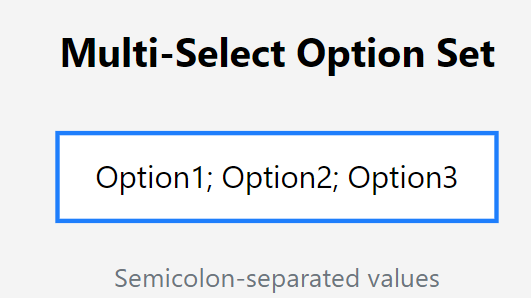
  3. For multi-select option sets, separate multiple values with a semicolon (;). For example:
Option1; Option2; Option3

✅ Pro Tip: Accuracy is key. Mistakes in formatting may cause import errors.

Step 4: Open Excel Online in CRM

Back in CRM, follow these steps:

  1. Navigate to the same blank view you used earlier.
  2. Click the three dots (···) in the toolbar, then select Open in Excel Online.

This will allow you to edit the data directly in the CRM environment.

Step 5: Copy and Paste Your Data

  1. Open your completed Excel template.
  2. Copy the filled data from your file.
  3. Paste it into the Excel Online sheet opened from CRM.

⚠️ Important: Use a semicolon (;) as the separator for multi-select option sets. If any other delimiter is used, the import process will fail.

Step 6: Save and Track Progress

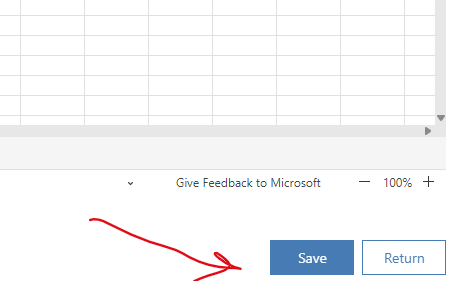
  1. Once the data is pasted, save your changes in Excel Online.
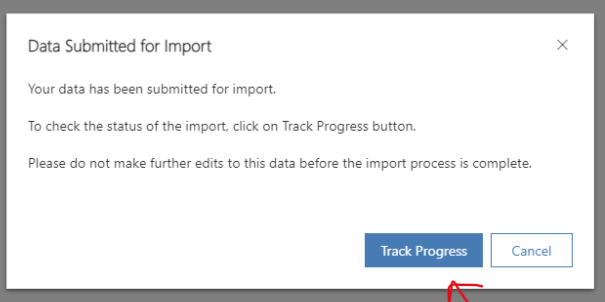
  2. The CRM system will automatically start the import process.
  3. Track the import progress directly in CRM by navigating to the Imports section.

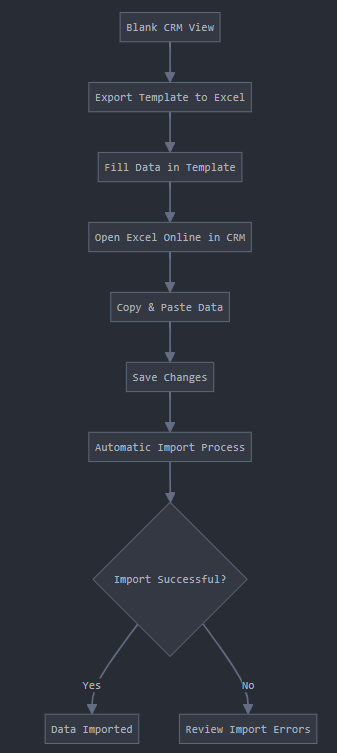
Import Process

Flowchart to visualize the entire import workflow:

Benefits of This Approach

  • Consistency: Using a blank template ensures that all required columns are present and properly formatted.
  • Accuracy: Direct edits in Excel Online minimize errors during upload.
  • Efficiency: Tracking progress in CRM helps identify and resolve issues quickly.

Always remember to use semicolons for separating values, double-check your formatting, and save your work frequently to ensure a smooth import experience.

Happy importing! 🚀

Wednesday, May 1, 2024

Applying the Single Responsibility Principle (SRP)

Applying the Single Responsibility Principle (SRP) in Report Processing

The Single Responsibility Principle (SRP) is a foundational concept in object-oriented programming that advocates for classes to have only one reason to change. This principle promotes modular, readable, and maintainable code by ensuring that each class or module encapsulates only one responsibility or behavior.

Example Scenario

In our scenario, we have a reporting system responsible for processing various report items asynchronously. To uphold the SRP, we aim to refactor our report processing logic into distinct components that each fulfill a specific responsibility, such as data encapsulation, processing orchestration, and logging.

Implementation

1. ReportItem Class

public class ReportItem
{
    public Guid Id { get; set; }
    public string Name { get; set; }
    public ReportItemStatus Status { get; set; }
    public string ErrorMessage { get; set; }
}

The ReportItem class represents a report item entity, encapsulating properties like Id, Name, Status, and ErrorMessage. This class is solely responsible for managing data related to a report item.

2. ReportProcessor Class

public class ReportProcessor
{
    private readonly IReportService _reportService;
    private readonly ILogger _logger;

    public ReportProcessor(IReportService reportService, ILogger logger)
    {
        _reportService = reportService;
        _logger = logger;
    }

    public async Task ProcessReportItemAsync(Guid itemId)
    {
        var item = await _reportService.GetReportItemAsync(itemId);

        if (item == null || item.Status != ReportItemStatus.Pending)
        {
            _logger.LogWarning($"Report item with ID {itemId} is not available for processing.");
            return;
        }

        try
        {
            _logger.LogInformation($"Processing report item: {item.Name}");

            item.Status = ReportItemStatus.Processing;
            await _reportService.UpdateReportItemAsync(item);

            await SimulateReportProcessingAsync(item);

            item.Status = ReportItemStatus.Completed;
            await _reportService.UpdateReportItemAsync(item);

            _logger.LogInformation($"Report item processed successfully: {item.Name}");
        }
        catch (Exception ex)
        {
            item.Status = ReportItemStatus.Failed;
            item.ErrorMessage = ex.Message;
            await _reportService.UpdateReportItemAsync(item);

            _logger.LogError($"Failed to process report item: {item.Name}. Error: {ex.Message}");
        }
    }

    private async Task SimulateReportProcessingAsync(ReportItem item)
    {
        // Simulate report processing
    }
}

The ReportProcessor class is dedicated to processing report items asynchronously. It utilizes an injected IReportService for data retrieval and updates and an ILogger for logging processing outcomes and errors. This class demonstrates a clear responsibility focused on orchestrating the report processing workflow.

3. Interfaces

public interface IReportService
{
    Task<ReportItem> GetReportItemAsync(Guid itemId);
    Task UpdateReportItemAsync(ReportItem item);
}

public interface ILogger
{
    void LogInformation(string message);
    void LogWarning(string message);
    void LogError(string message);
}

Interfaces like IReportService and ILogger define contracts for interacting with report data and logging actions, respectively. Leveraging interfaces promotes loose coupling, facilitates dependency injection for enhanced testability, and enables flexibility in swapping implementations.

Conclusion

In this example, we've refactored our report processing logic to adhere to the Single Responsibility Principle (SRP). Each class (ReportItem, ReportProcessor) embodies a distinct responsibility, such as data encapsulation or processing orchestration. Meanwhile, interfaces (IReportService, ILogger) facilitate decoupling and abstraction, fostering maintainable and extensible code.

By applying SRP, we've established a modular and maintainable design where each component is dedicated to a specific aspect of report processing. This design approach enhances code clarity, adaptability to changing requirements, and adherence to best practices in software design and architecture. Ultimately, embracing SRP contributes to a cleaner and more manageable codebase, promoting robustness and scalability in our reporting system.

Wednesday, February 7, 2024

Unveiling the Power of Microsoft CRM Managed Solutions

In the fast-paced world of CRM and app development, Microsoft consistently shines with its innovative solutions. One standout is the Managed Solution in Microsoft CRM, a game-changer for customization and deployment. This guide dives into the details of MS CRM Managed Solutions and Solution Layers, highlighting their importance and the latest updates related to Power Apps.

Managed Solutions and Their Key Components

Managed Solutions are essential for packaging customizations and configurations, making it easier to bundle, distribute, and deploy components across different environments. Key components within Managed Solutions include:

  • Entities: Custom entities that define data structures, tailored to specific customer or industry needs.
  • Processes and Workflows: Automation tools that ensure standardized operations and boost efficiency.
  • Forms and Views: Customizable user interface elements for a seamless CRM experience.
  • Web Resources and Scripts: Enhancements for visual and functional aspects using images, scripts, and stylesheets.

Solution Layers: Structuring Customizations with Precision

Solution Layers are a core concept in Managed Solutions, providing a structured approach to customization. By organizing components into layers like Base, Sales, and Service, developers can create solutions that are easily extended, modified, or replaced without affecting core functionality.

Example Scenario

Imagine XYZ Corp implementing a Managed Solution in their CRM environment. This solution includes custom entities for tracking customer feedback, automated workflows for managing support tickets, and tailored forms for an intuitive user interface. Solution Layers help categorize these customizations, ensuring a systematic and organized deployment.

Latest Changes and Power App Integration

Microsoft's commitment to innovation has brought significant updates to Power Apps within the CRM ecosystem. Notable enhancements include:

  • Unified Interface Enhancements: Major improvements to the Unified Interface for Power Apps and Dynamics 365 applications, focusing on performance optimization and enhanced customization capabilities.
  • Dataverse Integration: Deeper integration of Dataverse, the data platform for Power Apps, streamlining data management with a unified data schema for both Power Apps and CRM customizations.
  • Power Apps Component Framework (PCF) Advancements: Empowering developers to create richer and more interactive customizations with improved capabilities and extensibility.

Updating Managed Solutions: A Step-by-Step Guide

Applying the Upgrade or Update in the Target Environment

  1. Development Environment Preparation: Open the unmanaged solution and customize components as needed.
  2. Version Incrementation: Increment version numbers when exporting the solution as a managed solution.
  3. Solution Update: Sign into Power Apps, select the target environment, and navigate to "Solutions" in the left navigation pane.
  4. Solution Action Options: Options include "Upgrade," "Stage for Upgrade," and "Update," each serving specific purposes in the update process.
  5. Post Import Actions: Decide on post-import actions, such as enabling plug-in steps and flows included in the solution.
  6. Import Confirmation: Wait for the import to complete and review the results.

Advanced Insights: Version Numbers, Component Removal, and Customization Overwrites

  • Understanding Version Numbers for Updates: A solution's version follows the major.minor.build.revision format. Updates must have higher version numbers than the parent solution.
  • Removing a Managed Component: Options include upgrading the solution in the development environment or deleting the managed solution, each serving specific use cases.
  • Overwrite Customizations Option: Use caution with the "Overwrite Customizations" option, as it can impact unmanaged customizations on components.

Patching and Deployment

Patching is a crucial aspect of maintaining and updating Managed Solutions. Here’s how you can effectively manage patches:

  • Creating Patches: Patches allow you to make incremental updates to a solution without modifying the entire solution. They include only the changes to entities and related assets.
  • Applying Patches: Patches can be applied to both managed and unmanaged solutions. They must have the same major and minor version numbers as the parent solution but a higher build and release number.
  • Cloning Solutions: When you need to roll up all patches into a new version, you can clone the solution. This creates a new version that includes all the patches, ensuring a clean and updated deployment.

Conclusion

Navigating the complex world of Microsoft CRM Managed Solutions requires a comprehensive approach. By understanding the core components, leveraging Solution Layers, and staying updated on the latest changes related to Power Apps, businesses can ensure a smooth and efficient customization deployment in their CRM environments. Always exercise caution and follow best practices, especially when updating solutions, managing dependencies, or overwriting customizations. The power to tailor CRM environments to specific needs lies with those who master the nuances of Managed Solutions and their evolving capabilities.

Additional Recommendations: Use a single publisher for all solutions across environments.

Mastering Dependency Injection in C# and ASP.NET Web API: A Comprehensive Guide

Hey there! 👋 Let's dive into Dependency Injection (DI) in a way that actually makes sense. No buzzwords, just practical knowledge you can use today.

Why Should You Care About DI?

Before we dive into the code, let's talk about why DI matters in real-world development:

  • Ever inherited a codebase where changing one thing breaks everything else?
  • Spent hours mocking dependencies for unit tests?
  • Struggled to swap implementations for different environments?

DI helps solve these headaches. Let's see how.

Starting Simple: The Basics

Let's build this up step by step with a real-world scenario. Imagine you're building an e-commerce API:

// Before DI - The Painful Way 😫 public class OrderController { private readonly OrderService _orderService = new OrderService( new PaymentProcessor( new PaymentGateway() ) ); } // After DI - The Clean Way 😎 public class OrderController { private readonly IOrderService _orderService; public OrderController(IOrderService orderService) { _orderService = orderService; } }

Real-World DI Patterns

The Constructor Injection Pattern (Your Go-To Choice)

This is what you'll use 90% of the time:


public class OrderProcessor { private readonly IPaymentGateway _paymentGateway; private readonly IOrderRepository _orderRepository; private readonly ILogger<OrderProcessor> _logger; public OrderProcessor( IPaymentGateway paymentGateway, IOrderRepository orderRepository, ILogger<OrderProcessor> logger) { _paymentGateway = paymentGateway; _orderRepository = orderRepository; _logger = logger; } public async Task ProcessOrder(Order order) { _logger.LogInformation($"Processing order {order.Id}"); // Your business logic here } }

Service Lifetimes Explained Simply

Think of services like employees in a store:

public void ConfigureServices(IServiceCollection services) { // The Store Manager (Singleton) - One person, there all day services.AddSingleton<IStoreConfig, StoreConfig>(); // The Cashier (Scoped) - One per customer services.AddScoped<IOrderProcessor, OrderProcessor>(); // The Shopping Assistant (Transient) - New one for each task services.AddTransient<IProductValidator, ProductValidator>(); }

Testing Made Easy

Here's how DI makes testing a breeze:

public class OrderProcessorTests { [Fact] public async Task ProcessOrder_WithValidPayment_Succeeds() { // Arrange var mockPaymentGateway = new Mock<IPaymentGateway>(); mockPaymentGateway.Setup(x => x.ProcessPayment(It.IsAny<decimal>())) .ReturnsAsync(true); var processor = new OrderProcessor( mockPaymentGateway.Object, Mock.Of<IOrderRepository>(), Mock.Of<ILogger<OrderProcessor>>() ); // Act await processor.ProcessOrder(new Order { Amount = 100m }); // Assert mockPaymentGateway.Verify(x => x.ProcessPayment(100m), Times.Once); } }

Advanced Patterns (When You Need Them)

The Decorator Pattern (Adding Behavior)

Perfect for adding caching, logging, or validation:

public class CachingOrderService : IOrderService { private readonly IOrderService _inner; private readonly ICache _cache; public CachingOrderService(IOrderService inner, ICache cache) { _inner = inner; _cache = cache; } public async Task<Order> GetOrder(int id) { var cacheKey = $"order_{id}"; if (_cache.TryGet(cacheKey, out Order order)) return order; order = await _inner.GetOrder(id); _cache.Set(cacheKey, order); return order; } }

Factory Pattern (When You Need Dynamic Creation)


public class PaymentProcessorFactory { private readonly IServiceProvider _services; public PaymentProcessorFactory(IServiceProvider services) { _services = services; } public IPaymentProcessor Create(PaymentMethod method) { return method switch { PaymentMethod.CreditCard => _services.GetRequiredService<ICreditCardProcessor>(), PaymentMethod.PayPal => _services.GetRequiredService<IPayPalProcessor>(), _ => throw new NotSupportedException($"Payment method {method} not supported") }; } }

Common Pitfalls (Learn From Our Mistakes)

❌ Circular Dependencies


// Don't do this! public class ServiceA { public ServiceA(ServiceB b) { } } public class ServiceB { public ServiceB(ServiceA a) { } } // Do this instead public class ServiceA { private readonly IServiceProvider _services; private ServiceB _b; public ServiceA(IServiceProvider services) { _services = services; } private ServiceB B => _b ??= _services.GetRequiredService<ServiceB>(); }

❌ Disposing Services Incorrectly

// Remember to dispose scoped services! public async Task ProcessOrders() { using var scope = _services.CreateScope(); var processor = scope.ServiceProvider.GetRequiredService<IOrderProcessor>(); await processor.ProcessPendingOrders(); }

Pro Tips 🚀

  1. Keep services focused (Single Responsibility Principle)
  2. Use constructor injection by default
  3. Register services in feature modules for better organization
  4. Always dispose of scoped services
  5. Use middleware for cross-cutting concerns

Wrapping Up

DI isn't just a pattern – it's a tool that makes your life easier. Start with constructor injection, use scoped services wisely, and remember: if a class needs to create its dependencies, it's probably doing too much.

Sri Lanka .NET 
                Forum Member